Accounting is incredibly important for every business . It creates the foundation for tax returns and allows you to easily see the company's financial standing. But what exactly is accounting and what does it consist of? Does accounting mean the same thing as administration? And how do I maintain good records? In this article, we tell you everything about accounting.
- What is accounting?
- Accounting components
- Interface with administration
- Digital and online accounting
- Digital accounting
- Online bookkeeping
- Do your own bookkeeping or outsource it
- Administration programs
What is accounting?
 Many people think that administration and accounting are the same.
However, accounting is a small part of the overall administration.
Bookkeeping encompasses all of a company's financial administration. The core of bookkeeping involves creating and processing invoices and filing tax returns. Many administrative tasks are related to bookkeeping. For example, consider a mileage registrationInitially, this is part of administration, but it becomes part of bookkeeping when the mileage registration is used as input for VAT administration.
Accounting components
Bookkeeping is therefore a part of administration. Bookkeeping itself can be further divided into various tasks, which we explain further below.
- Income
- Expenses
- Profit and loss account
- Balance
- Cash administration
- VAT return
- Salaries
Income
You send invoices to customers and keep proper records of invoicing. This gives you a clear overview of the company's income. Any interest received is also included in the company's income.
Expenses
All expenses incurred by the company are recorded and stored. Think, for example, of a coffee machine, building maintenance, packaging materials, legal advice, and so on. Previously, all receipts were kept, but these are now all stored digitally. Only receipts that are not personally identifiable, such as store debit cards, still need to be kept on paper.
Profit and loss account
If the company's administration is in order and invoicing and expenses are up to date, a healthy profit and loss statement results. From this, you can determine how much profit has been made, in which period this occurred, and how things could potentially be improved.
Balance
The balance sheet shows how the company is financed. It lists assets, equity, and liabilities.
Cash administration
The cash administration, also called the cash flow statement, lists all financial transactions that have taken place.
VAT return
If the bookkeeping is in order, you have a clear picture of the company's financial standing. But that is not all, as the Tax and Customs Administration must also be informed of the company's records. In the VAT return, you calculate how much VAT you still owe or will receive back from the Tax and Customs Administration. And this is, of course, also recorded in the bookkeeping.
Salaries
Payroll administration consists of pay slips, payslips, and annual statements. The payslip provides an overview of an employee's earnings. The annual statement contains the information required annually by the Tax and Customs Administration regarding wages, withheld payroll tax and national insurance contributions, citizen service number (BSN), etc. A payroll journal entry imports the data relevant to accounting from the payroll administration into the financial statements.
Interface with administration
Besides the standard accounting components, there are many administrative components that intersect with bookkeeping. Consider, for example, mileage tracking, travel expense tracking, time tracking, and personnel administration. These four components provide input to bookkeeping and, together with the bookkeeping itself, form the core of the administration.
Digital and online accounting
In the past, everything was done with pen and paper, and receipts were handed over to the bookkeeper every now and then. With the advent of (online) software programs and Excel , that became a thing of the past. Since the rise of online bookkeeping, simple bookkeeping is possible for everyone.
Digital accounting
You decide how you do your bookkeeping. Data may be submitted digitally to the Tax and Customs Administration, so it is no longer necessary to print all data and keep it on paper. You can keep track of all data in Excel, for example, or in specialized offline accounting software that requires a one-time investment. You then maintain the records on the computer where you have installed the software. Digital bookkeeping is secure, fast, and inexpensive, and has the advantage over paper-based records that overviews can be generated for quick and easy insight into income, expenses, and other accounting components. Furthermore, there are increasingly more integrations available to link your accounting software to other administrative software, allowing you to save time and money. The benefits of digital bookkeeping are:
- data is not stored in the cloud, so it is difficult for hackers to access it;
- no monthly fees, often only a one-time purchase price;
- Not dependent on the internet. You can also do bookkeeping without an internet connection.
The disadvantage of digital accounting is that the data is only available on the computer with the administration program.
Online bookkeeping
Online bookkeeping also works digitally, but using accounting software located in the cloud rather than installed locally on your computer. You view your records using your own online account on a website or app available on any computer or smartphone. A monthly fee is usually charged for this. The benefits of online bookkeeping are:
- being able to log in directly from any location;
- insight into automatically generated overviews;
- data is stored online;
- possible connection to other programs for e.g. mileage registration and inventory management.
The disadvantage of online bookkeeping can be that you always need an internet connection to gain insight into your accounting.
Do your own bookkeeping or outsource it
Outsourcing bookkeeping is not mandatory. For sole proprietorships, an approved auditor's report accompanying the annual accounts is not required. Larger companies, however, may be required to include this. Depending on the type of business and the entrepreneur's financial knowledge, one can therefore choose to do the bookkeeping oneself or outsource it. Doing your own bookkeeping to save money? It sounds so simple, but if you make a mistake and receive fines from, for example, the Tax Authorities, you might end up paying more.
Maintaining proper bookkeeping requires knowledge and experience in the field. For example, doing your own bookkeeping is easily manageable for freelancers with financial expertise. They often send and receive fewer invoices than large companies, which often outsource their bookkeeping. Digitization and online options have made bookkeeping easier. More and more entrepreneurs are starting to do their own bookkeeping using online software and ultimately only have their books audited by an accountant.
Administration programs
If you want to digitize your administration yourself, there are both cloud solutions (online bookkeeping) and locally installed programs (digital bookkeeping) available for freelancers, self-employed administration , or SME administration .
Below, we provide some examples of administration programs you can use for your bookkeeping. Of course, there are many more providers of administration software.
Inform
Informer's accounting software is suitable for every entrepreneur. The advantages of this online accounting program are its speed, simplicity, and clarity. Informer has multiple integrations with other software packages. It's also possible to submit VAT returns directly to the Dutch Tax and Customs Administration.
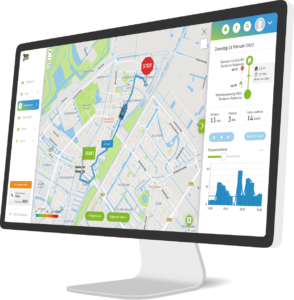
And via the integration with TrackJack, you can easily link your mileage tracking to your accounting.
Exact Online
The financial software Exact Online is the online version of Exact's administration program. Because it is online software, you can maintain the administration yourself and easily make it available to a bookkeeper or accountant.
MoneyMonk
MoneyMonk's online accounting software is specifically designed for (starting) freelancers. The software is clearly designed and supports virtually all Dutch banks. This allows payments to be directly linked to outstanding invoices.
Visma
Visma eAccounting is suitable for every sector of the SME. With the smart software, administration is fully automated and nothing needs to be done manually. With the accompanying free app, you can view the administration from any location.
Tip: With the TrackJack PRO Fiscaal , you automatically register all your trips – tax-approved and recognized by the Tax Authorities. View the PRO Fiscaal in our webshop →
